
Shared information
Patient data, orders, observations, procedures and documents share one workflow.
RemCard brings together orders, vital signs, infusion therapy, ventilation, procedures, laboratory investigations, surgical events and documents in one workspace.
The browser demo is designed for a PC with a mouse and a large screen. The interface is not adapted for phones.
About the project
RemCard is a desktop application for patient care documentation in intensive care and during surgery. Doctors, nurses and operating-room staff work with shared information, while each sees the tools needed for their role.
Patient data, orders, observations, procedures and documents share one workflow.
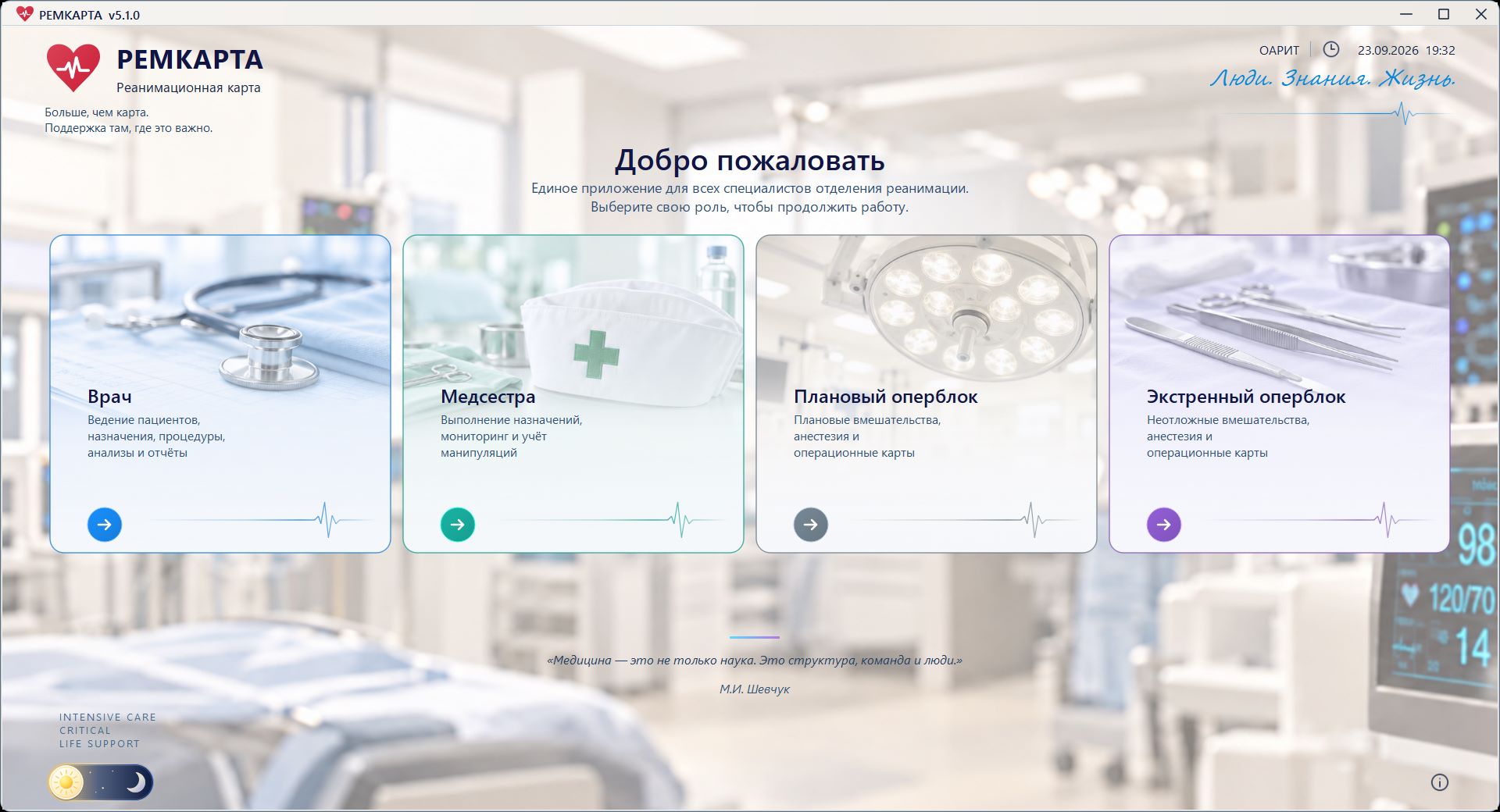
A single RemCard.exe opens four workspaces: doctor, nurse, planned OR and emergency OR.
The application is intended primarily for Windows workstations and a medical organisation's local network.
About RemCard ICU
Dedicated pages help you quickly assess whether the project fits a particular task in your department.
The problem it addresses
RemCard does not make decisions for clinicians. It helps keep working information in one clear workflow.
Who it is for
Doctor, nurse, planned OR and emergency OR workspaces open from the shared RemCard.exe window. Administrative functions are grouped in one settings centre.
Makes clinical decisions and maintains the patient chart.
Records order completion and observations throughout the shift.
Documents planned and emergency surgical cases.
Service functions in settings, rather than a separate workspace.
Core features
Each module handles its part of the workflow while staying connected to the patient, shift and user's role.
The actual interface
Five screens show role selection, patients, beds, orders and fluid balance. Interface screenshots 5.1.0 use demonstration data; the current project version is 5.1.20. The application interface in the screenshots is in Russian.
A single RemCard.exe opens four workspaces: doctor, nurse, planned OR and emergency OR. Users select their role in the shared window.
The patient journey
Records build on one chart, from registration to case completion or archiving.
How it works
Each role has its own interface, while committed changes are saved in the shared data folder.
A successful-save message appears only after the data has actually been written to the database.
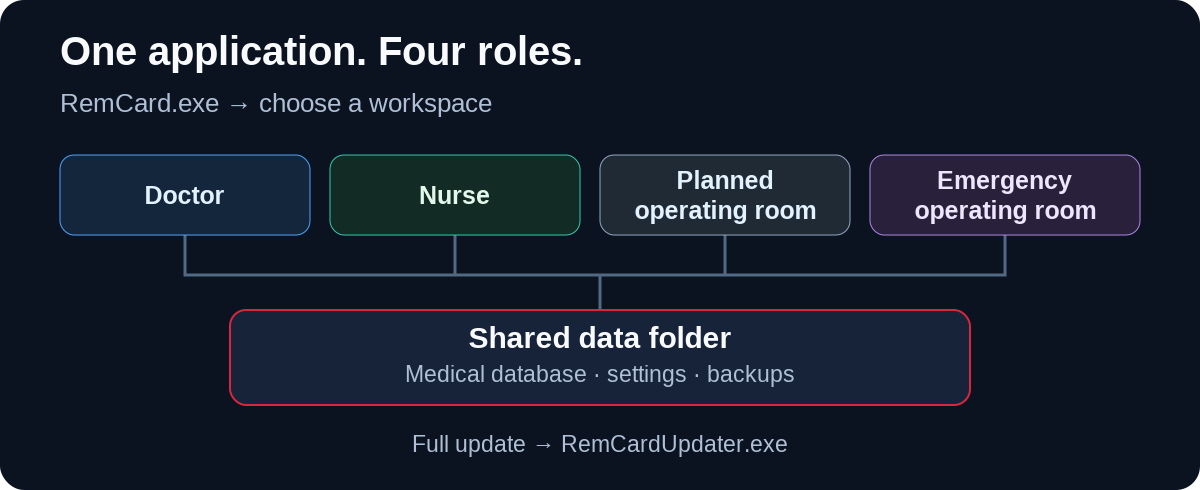
Validated local replicas are used for reading; committed shared-database records remain the source of truth. Emergency sign-in checks whether the local copy is suitable and how old it is. Returning to network mode and transferring changes use a separate workflow.
Main technical flow:
Interface→application services→data access layer→SQLiteServices separate the user interface from data operations. Writes are transactional; network configuration, backup and recovery are higher-risk areas documented in the project documentation.
Open the interactive architecture mapLocal network
The application runs on Windows workstations. They can use a shared data folder, with primary information stored in SQLite.
Safety and responsibility
RemCard is an experimental software project and is not registered as a medical device. It does not replace clinical protocols, professional medical judgement, an organisation's hospital information system or required clinical supervision.
Technical and clinical validation are required before real-world use.
Backup and recovery must be tested with a test database.
Never publish real patient data in GitHub Issues.
Deployment is the responsibility of the organisation using the software.
Technology
RemCard is built with Python, Qt and SQLite, tested automatically and developed openly on GitHub.
Source code
The source code is available on GitHub under the RemCard Proprietary Source License 1.1. Individuals may study, modify and use the project non-commercially; organisational and commercial use require written permission.
Version 5.1.20.
Changes and installation requirements are published on this release's page.
Open release page 5.1.20Project history
RemCard is created and developed by Vadim Bityutsky, a practising anaesthesiologist and intensivist. I develop the application to reduce repeated documentation, bring patient information together and give a clearer view of the department’s work.
AI helps me work through specific technical questions and speed up some stages of development.
The project welcomes review and contributions. This site does not make unverified claims about deployments, organisations or user counts.

RemCard's author is listed in the Clinicians That Code directory.
Project overview
RemCard ICU is an experimental desktop application developed by Vadim Bityutsky, an anaesthesiologist and intensive care physician. It brings patient records and shift workflows together for doctors, nurses and operating-room staff. The current interface and main documentation are in Russian.
Shared clinical records. Role-specific workspaces cover prescriptions and administration records, vital signs, fluid balance, ventilation, procedures, laboratory results, operative events, reports and an archive.
Local-network deployment. Windows workstations use a shared data folder and a central SQLite database. Validated local read replicas help with reading; committed central records remain the source of truth. Network behaviour, permissions, backups and recovery require acceptance testing in the intended environment.
Source-available licence. The code is published under the RemCard Proprietary Source License 1.1. Non-commercial use by individuals is permitted; organisational use and any commercial use require prior written permission from the copyright holder.
Experimental status. RemCard is not a registered medical device and does not replace clinical judgement or protocols. Automated tests and built-in safeguards do not establish clinical safety. Independent technical, security and clinical validation, local acceptance and a backup workflow are required before real-world use.
No fixed deadlines
These are development directions, not promised release dates. Implemented clinical modules continue to be refined and tested.
FAQ
A short guide to project status, platform, data and ways to help.
Didn't find an answer? Contact the project author or ask in GitHub Issues, without real patient data.
RemCard is a specialised application for intensive-care and operating-room workflows. It is not presented as a complete replacement for an organisation's hospital information system.
No. The project is not registered as a medical device and is distributed as experimental software.
Internet access is not required for routine work within an organisation. Shared workstations need access to a common data folder on the local network.
Windows is the primary tested platform. Official Linux and macOS support is not claimed.
Primary data is stored in SQLite databases in the selected data folder. Check the path, permissions, backups and recovery before use.
Yes. The Windows installer and full ZIP package are published on the latest release page. Before the first launch, close older clients and read the release requirements.
Open GitHub ReleasesCreate a GitHub Issue and describe the steps to reproduce the problem. Before publishing, remove all real patient data, paths and other sensitive information.
Open IssuesStar the repository, test on a demo database, describe a bug in detail, improve the documentation, add tests or open a pull request.
RemCard is developed as a public source-available project. A GitHub star, bug report, suggestion from a clinician or contribution from a developer helps make it more robust and easier to use.
menfise@mail.ru